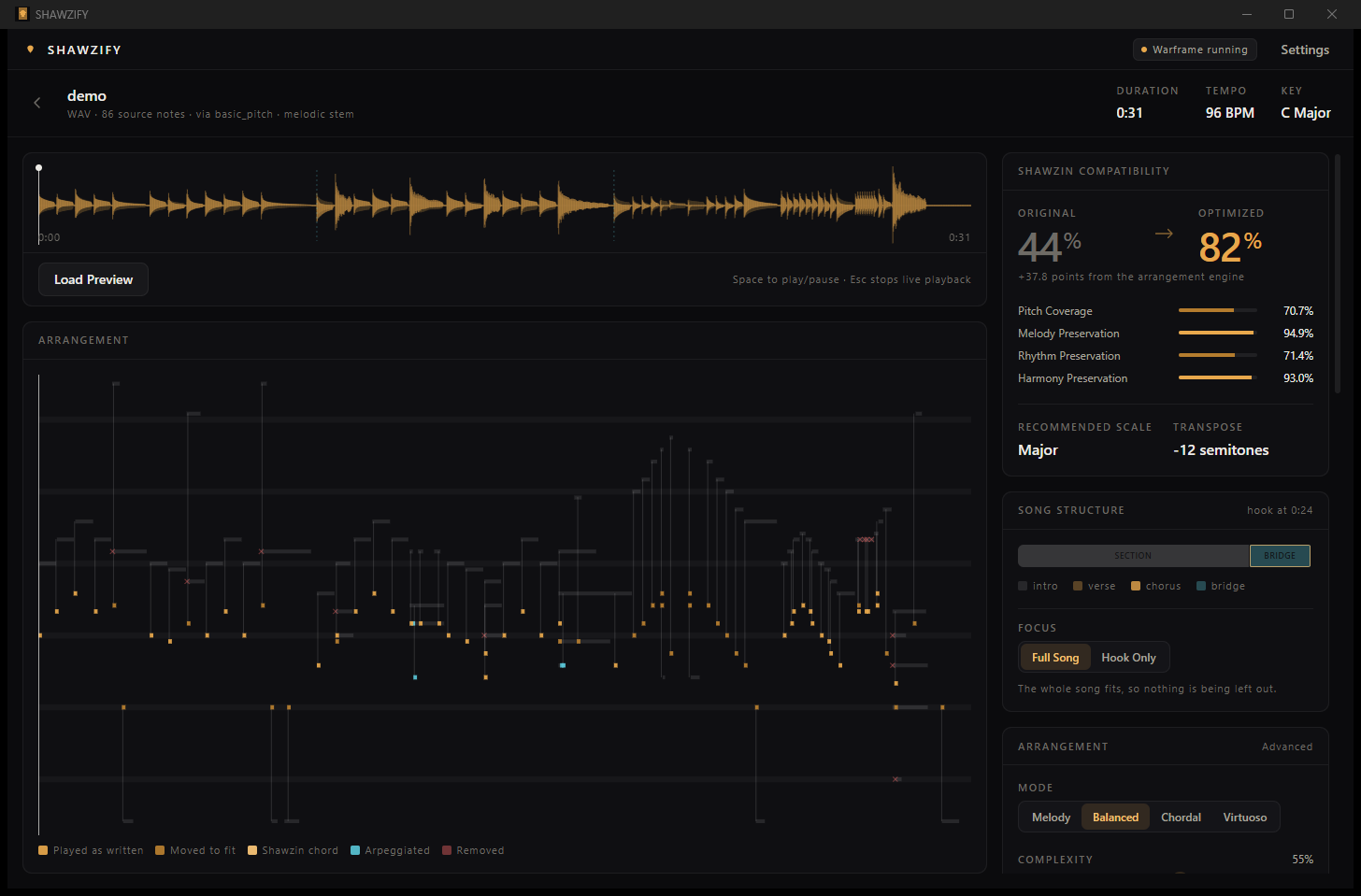
SHAWZIFY listens to a track, works out which parts of it actually carry the tune, and rearranges those for the twelve notes a Warframe Shawzin can play. You get a song code you can paste into the game — and a full account of every note it had to change to get there.
Windows · MIT licensed · runs entirely on your machine · no account, no telemetry, nothing uploaded
A Shawzin has three strings and three frets. Twelve reachable notes, one fret position at a time, four minutes and a thousand notes per song. Converting MIDI note 64 into a key press is a lookup table. Deciding what a song becomes when it has to fit through that is the actual problem, and it is what this project is.
Each source note is scored on confidence, velocity, melodic prominence, duration, rhythmic salience and where it falls in its phrase. A peak in the top line outranks an inner voice at the same pitch.
Each candidate is scored on interval fidelity, pitch-class coverage, importance-weighted coverage, range fit, contour preservation and tonal anchoring. Intervals carry as much weight as coverage on purpose: a scale that owns every note of the melody but has to fold half of them into another octave has kept the pitch classes and thrown away the tune.
Notes are mapped as a path, not one at a time: a Viterbi pass weighs voice leading, contour direction and interval distortion together. Mapping each note independently is exactly why naive converters jump octaves mid-phrase.
Only notes sharing a fret row can sound together. Survivors are ranked root and third before seventh before fifth, bass and top voice protected — and where a chord matches one of the twelve combined-fret positions, that position is used instead.
A sliding window finds the passages that exceed what a player can hit and thins only those. Removing globally-least-important notes would wreck the quiet bars to pay for the loud ones.
Chroma plus register, density and energy contours find the sections; the part that repeats and hits hardest is the hook. Density reduction sacrifices an intro long before it touches a chorus — and Hook mode arranges just that part.
Paste a YouTube link, drop an MP3, or open a MIDI file. The rest is one pipeline.
fetch ─▶ decode ─▶ separate stems ─▶ transcribe ─▶ analyse
                                                     │
                                     structure ──────┤
                                     importance ─────┤
                                     quantize ───────┼─▶ scale search ─▶ map ─▶ reduce ─▶ encode
                                                     │
                                     your settings ──┘                              ▼
1BAACAIEAQJAYKAgMAoplayable / total, which would rate anything already in C pentatonic at 100% no matter how badly it was arranged. On audio it says so plainly: it measures the arrangement, and it cannot hear your recording, so a high score means the arrangement was faithful to the notes that were transcribed.The eleven variants differ in polyphony, sustain, chord type and tuning — which changes what is playable, not just what it sounds like. SHAWZIFY ranks them for the arrangement in hand and says why: a bass riff wants the Tiamat, a chord piece wants a polyphonic one, and a fast line ranks the 28-second Lizzie last because it would smear into itself.
Your audio is never uploaded. The network is touched twice: when you explicitly paste a link, and once to download an ML model the first time you use it. There is no account, no telemetry and no analytics.
Measured on real tracks, not assumed. The instrument has twelve notes; some music survives that and some music does not, and you should know which before you spend ten minutes on a conversion.
A Tauri window with the waveform, the piano roll, the controls and in-game playback. Drag a file onto it and go.
shawzify webThe same interface, served to a browser tab from 127.0.0.1 with a token. Drop a file on it, download every export, no installer and no Rust toolchain. Only in-game playback is desktop-only.
shawzify convertOne command from a file or a link to a song code, with --json for the whole decision trail. Scriptable, and the engine works as a Python library too.
SHAWZIFY can perform an arrangement for you by sending ordinary keystrokes — the same ones your keyboard sends — and only while Warframe is the window in front. It does not inject anything, read or write game memory, hook the client, or interact with anti-cheat in any way. The focus check runs before every single note and cannot be switched off; alt-tab away and playback stops.
SHAWZIFY is an independent fan project. WARFRAME and the Shawzin are trademarks of Digital Extremes Ltd. No game assets are included or distributed, and no copyrighted music is shipped with it.
Windows, Python 3.12, Node 18+. Rust only if you want to build the desktop app yourself.
git clone https://github.com/omercsbn/shawzify
cd shawzify
scripts\setup.ps1              # add -SkipMl to skip PyTorch and Demucs

scripts\dev.ps1                # the desktop app
scripts\dev.ps1 -Cli web       # the same interface in a browser
scripts\dev.ps1 -Cli convert assets\demo\demo.wav
Something not working? The troubleshooting guide covers FFmpeg, GPU detection, links, the browser interface and in-game timing. Bad arrangement? Tell us about it — that is the most useful report this project can get.